Spell Checking
 Spell Check is a function in the text module which allows you to check if you made any spelling mistakes while writing.
To activate the function simply press the Spell Check icon on your toolbar and then select "Check Spelling".
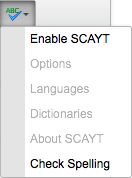
A popup window called "Spell Check" will appear:
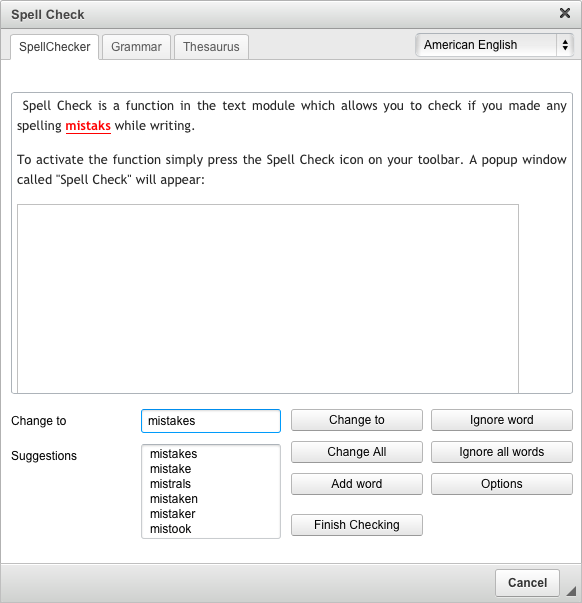
At the top of the Spell Checker tab you will find an area with your text. The first word which is incorrect will be highlighted.
If you want to correct the mistake:
- Choose the word you had in mind from the list in the "Suggestions:" field. If you pick a word it will appear in the "Change to" field.
- Press "Change to" and the highlighted word will be corrected. If you want to correct the same mistake in the whole text press "Change All"
- To ignore the mistake press "Ignore word".
- To ignore the mistake in the whole text press "Ignore All".
Once you do not see any mistakes that are highlighted, click on "Finish Checking".
Grammar and Thesaurus
If you want to improve your writing you can click on the Grammar tab or the Thesaurus tab. These tabs will evaluate your text and offer suggestions to make changes.
Spell Check as You Type (SCAYT)
An additional option under the Spell Check menu is "Enable SCAYT". When you enable Spell Check as You Type the text editor will check your spelling as you write your content. A squiggly red line will appear under any misspelled words. To correct the spelling of these words, right-click on the words and choose the correct spelling.
When you are finished click "Save this content".