Getting Images Ready for the Web
When creating images for the web you'll want to make sure your software is measuring in pixels and that the resolution of the image is 144 dots per inch (dpi) OR ppi (pixels per inch). Check with us to find your maximum width.
You should resize your image to the exact dimension or at least very close to the dimension you need the picture to be in the text editor.
There are several free websites that allow you to crop and resize images. Below are just a few...
- Adobe Creative Cloud Express - free, fully-featured photo editor
- Pixlr Online Photo Editor - free photo editing
- quickthumbnail.com - resize images
Mac Users
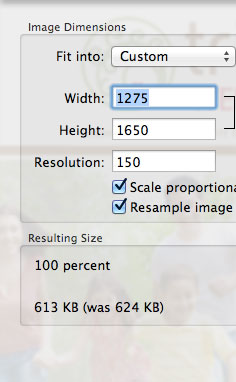
Preview on a Mac is perfect for resizing images. Open the image in Preview and then choose Tools > Adjust Size
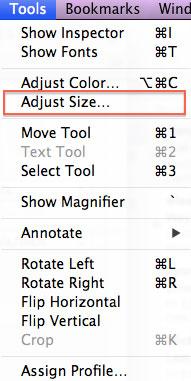
Then in the pop-up you can make the size adjustments.