Formatting Text
Text formatting determines how your text will look in your document. Making your text look better is very easy using the Text Module.
If you select any of the text formatting options, you will learn that the button on the toolbar will highlight after you select the button. If you want to disable the function press its button again.
Bold, Italic, Underlined and Strike-through
 Makes your font bold
 Makes your font italic
 Makes your font have an underline

Makes your font have a srike line through it
Text Alignment
 Aligns your text at the left side of the editing area
 Aligns your text at the center side of the editing area
 Aligns your text at the right side of the editing area
 Each line will have the same length even though they don't have to have the same amount of words or letters. The lines will just expand and the text will be equally long so that the lines will end in the same place.
Format Menu

The format menu is used for organizing your text and to distinguish different parts of your text area. For example if you want to have different titles/categories and subcategories, you should use the format menu and choose from the different heading tags.
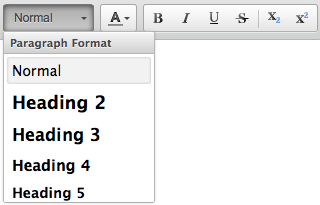
There are 5 heading tags (H2-H6). To be clear there is a reason why they are named in an ordinal fashion. This is because higher heading numbers such as H1 and H2 are given more of a "prominence" in eyes of search engine. The H1 tag is on magnitudes higher than H2-H6. In our system, only 2 things ever have a H1 tag: The first is your business name in the logo and the second, and even more importantly, is your Page Title. From there, we try to arrange the rest of the heading tags in a proper hierarchy. H2 tags should be smaller than the page title, but bigger than the H3 tag. Perhaps it is even represented as a different font. The rest of the heading tags should proceed in a similar order.
We encourage our clients to lay out the content of their pages as if they were writing a term paper with a title, headings, sub headings and sub-sub headings. This is, after all, is how search engines "read" a website. They do not see any color or font sizes but they do recognize structure. For instance, even though the H1 tags is very important if everything on the page was wrapped around a H1 tag and styled to look differently (by the way, this is 100% possible to do - a website could literally be written with only 1 HTML tag) Google would see the structure of the page and immediately dismiss it. If everything is important, than nothing is important. But, if you follow a natural method of presenting your content than you can be rewarded.
Colors
 If you want to change the color of your text then press the text color button. Several colors will appear in a menu. If you are not satisfied with the colors available in that panel click "More colors...".
To choose the color you want to use, just click on it.

Subscript and Superscript
 Subscript is a way to put an index to a letter or to a number. The subscript has a smaller font than the normal text. You can use either a number in a subscript or a text.
 The superscript work in the same way as the subscript but instead of placing the index in the bottom you place it in the top. This function is usually used in mathematical equations to write the "to the power of" function.
You can also mix these two functions.